Showing posts with label sap-hana-cloud-platform. Show all posts

Monday, 20 March 2017

Five stars to SAP HANA Express Edition on Google Cloud Platform

Ever since I installed my SAP HANA, express edition (HXE), instances on Google Cloud Platform I have been using them as my main platforms for development and different experiments. My experience has been so good that I feel it has to be shared so others do not miss on it.

What I like about Google Cloud Platform (GCP) is that it makes it extremely easy to get my SAP HANA instances up and running when and how I want them.

The web SSH client and GCloud console stand out as a star feature. Two clicks and you are logged in to the operating system, ready to cast some commands using the web interface.

SAP HANA Tutorials, SAP HANA Materials, SAP HANA Certifications
After building some applications and adding data into them, GCP warned me that my instances were overutilized and suggested a more cost-effective and better configuration. The statistics in the monitoring were in agreement, showing that the instances were hungry for more resources. Feeding more RAM and CPU to them was easy as sliding a bar or entering the exact amount of RAM I want and turning the machines back on.

SAP HANA Tutorials, SAP HANA Materials, SAP HANA Certifications

The only requirement to adding more resources is that the virtual machine is turned off.

This requirement also applies to taking a snapshot of your instance. Other than the traditional uses of HXE, I sometimes like to test different configurations or simply try what I would not dare do in a productive or even shared environment. A snapshot allows me to go back to the point where the virtual machine was up and running before, for example, locking myself out. The best part is that taking a snapshot and recovering it is almost as fast a CTRL+Z.

SAP HANA Tutorials, SAP HANA Materials, SAP HANA Certifications

Now, what you (and your wallet) have been waiting for: The Price. The basic instance can run on as low as 0.20 USD/hour. Because I keep three flavors of HANA Express Edition (server only, Server only + XS Classic Tools and Full XS Advanced installation), I tend to turn them on and off as I need one or all of them. I was expecting a big reduction of the free initial credit that I was lucky to get from Google Cloud Platform when I signed up, but no: Unlike many other providers, Google Cloud Platform bills you by the minute after a minimum of 10 minutes. In other words, not only is it unbelievably cheap but it also takes off the pressure of taking into account what time it is before you turn the instance off. You can take a look at the billing principles and estimate your monthly costs in their comprehensive pricing site.

SAP HANA Tutorials, SAP HANA Materials, SAP HANA Certifications

Google Cloud Platform also sends you weekly emails as well as the bill. Consequently, there are no surprises at the end of the month if, for example, you forgot to turn off one of your instances.

Do I need to remind you that SAP HANA, express edition, comes with a perpetual free license for productive use up to 32 GB RAM? In case this needs translation: You can have the transalytics, predictive, geospatial and real-time power of a world-class in-memory database licensed for free and a very low infrastructure cost.

Thursday, 16 March 2017

RFID Sensor Integration with HANA Cloud Platform

Business case: if there is any goods need to be track from warehouse, RFID technology might be a good choice. RFID sensors with HANA cloud platform will provide live tracking of goods.

Here is the below components being used to implement this business case,
  • RFID Reader : RFID RC522
  • RFID Tag
  • ESP8266 Wifi Module
  • Hana Trial Account

Tuesday, 27 December 2016

Port of Antwerp from the Opendata challenge perspective – part 4

In the last part (part 3), we saw how to import a CSV file into HANA using HANA Studio where we converted the geoJSON filed into WKT, let’s now see how we can take care of the same content but in a JSON format.
if you remember, our CSV file (http://datasets.antwerpen.be/v4/gis/grondwaterstroming.csv) is also available in JSON format.

So the link to our JSON content is: http://datasets.antwerpen.be/v4/gis/grondwaterstroming.json, this will only return the first thousand rows (and luckily this has only 123 rows, but I will show you how to implement the pagination).

Saturday, 24 December 2016

Port of Antwerp from the Opendata challenge perspective – part 3

In the last part (part 2), we saw how to import a CSV file into HANA using HANA Studio, let’s now see how we can take care of the geometry column.
If you want to learn more about geoJSON, you can check the following website: http://geojson.org/

if you remember, our CSV file (http://datasets.antwerpen.be/v4/gis/grondwaterstroming.csv) has a field named “geometry” which is a geoJSON stream.

As stated before HANA does support this format yet with the proper ST_GEOMETRY data type constructor or constructor. So we will need to convert this field to a “Well-Known Text” format.

Friday, 23 December 2016

Port of Antwerp from the Opendata challenge perspective – part 2

Now that we have our HANA instance up and running in the SAP HANA Cloud Platform trial platform as described in part 1 of this blog series, we can now start importing CSV like type of data.

This dataset is available in different format: CSV, JSON, XML, KML and MAP.

Step 1: Download and explore the file locally

Open the following URL and save the file locally: http://datasets.antwerpen.be/v4/gis/grondwaterstroming.csv

Open the file with a text editor like Notepad++ or Textpad or any text editor that you are used to. It only contains 123 rows.

Tuesday, 13 December 2016

Port of Antwerp from the Opendata challenge perspective – part 1

Getting Access to the SAP HANA Cloud Platform trial platform

Here is how to register for a developer/trial account: Sign up for an free trial account on SAP HANA Cloud Platform

This should not take you more than 5 minutes to receive the account activation link and get to the HCP Cockpit. You will be assigned a “P” user id (unless you have an SAP account already and you want to use it with your “S” user id).

Saturday, 10 December 2016

EHP upgrade and HANA migration. Lessons learnt

The system was based on SAP EHP Release 7.01 running on an Oracle database that had over 8.7 Terabytes. Additionally, the pre-existing landscape and the target one are hosted on premises, under virtual servers on vSphere 6.0. Software  wise, our customer system is based on Vehicle Management System (IS-A-VMS), although with a significant amount of customizations and custom code.

The original motivation to initiate this project followed an analysis of the usage of the system, and based on our predictions of additional data volume, additional markets, etc. it was quite clear that we needed to take some measures to keep the response times within reasonable limits. Furthermore, it was quite obvious that HANA was the future for SAP based systems, so at some point we would have had to contemplate a migration.

Wednesday, 30 November 2016

Friday, 25 November 2016

Securing SuccessFactors Extensions on SAP HANA Cloud Platform

Overview

SAP HANA Cloud Platform, extension package for SuccessFactors allows you to extend your SuccessFactors scope with applications running on the platform. The extension package makes it quick and easy for companies to adapt and integrate SuccessFactors cloud applications to their existing business processes, thus helping them maintain competitive advantage, engage their workforce and improve their bottom line.

Monday, 21 November 2016

Installing HANA Express on AWS – Detailed Walkthrough

Introduction

This blog details the steps to deploy your own HANA Express (HXE) Instance on Amazon Web Services (AWS).

A couple of reasons I used AWS to host a HXE instance –
  • Didn’t have a computer with the recommended specs (namely the 16GB of RAM)
  • Initially I tried using SAP’s Cloud Appliance Library to deploy a HXE instance but unfortunately its restricted to the region “US EAST”, which isn’t ideal from Australia.
  • AWS provides a lot of flexibility and is cost effective for hosting your own HANA system

Saturday, 12 November 2016

SAP Text Analysis Microservices on YaaS

Introducing Text Analysis for everyone…

Text Analysis microservices – built on SAP HANA – allow you to process unstructured textual content from a variety of document formats and transform it into structured data without the liability or concern for hardware infrastructure, installation, or maintenance. This information discovery service facilitates enterprise decision-making processes by extending the value of your business intelligence investments that report off structured data. You can find these analytical microservices on the SAP Hybris as a Service (YaaS) Market and incorporate them into whichever technology platform you use.

Saturday, 5 November 2016

Secure your HANA Cloud Connector with OpenSSL certificates – Part 3

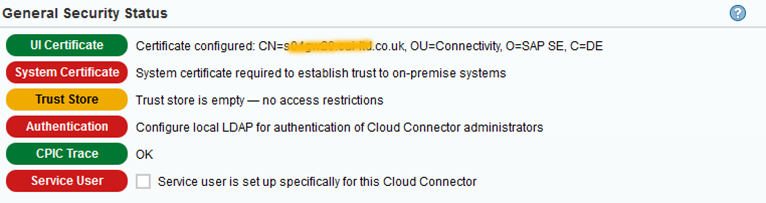
In parts 1 and 2 of this blog series, I showed how to secure your SCC with a trusted UI Certificate as well as how to further secure your SCC with a trusted System Certificate, put your CA certificate in the Trust Store, install a SCC CA Certificate and with that enable Principal Propagation. As a result, we got 4 green boxes in the SCC General Security Status:

Secure your HANA Cloud Connector with OpenSSL certificates – Part 3

Friday, 4 November 2016

Secure your HANA Cloud Connector with OpenSSL certificates – Part 2

In part 1 of this blog series, I showed how to secure your SCC with a trusted UI Certificate:

Secure your HANA Cloud Connector with OpenSSL certificates – Part 2

Therefore, in this blog, I will show how to further secure your SCC with a trusted System Certificate, put your CA certificate in the Trust Store, install a SCC CA Certificate and with that enable Principal Propagation.

Wednesday, 26 October 2016

Secure your HANA Cloud Connector with OpenSSL certificates – Part 1

Out of the box, the HANA Cloud Connector (SCC) is not secure, as clearly documented by the General Security Status:

Secure your HANA Cloud Connector with OpenSSL certificates – Part 1

As mentioned in the General Security Status, the out of the box SSL certificate does not use the host name as its common name (CN) and is therefore not trusted:

Tuesday, 25 October 2016

Enable TLS on HANA Web Dispatcher with OpenSSL certificates

Out of the box, my HANA Web Dispatcher comes with a self-signed SSL certificate, which makes its connections insecure:

Enable TLS on HANA Web Dispatcher with OpenSSL certificates

Friday, 21 October 2016

SAP HANA XS Classic, Develop your first SAP HANA XSC Application

Using HANA Cloud Platform


Each Trial HANA instance comes with the HANA Web-based Development Workbench. The workbench allows you to develop on HANA without the need to set up a local development environment.

Login to the HANA Cloud Cockpit with your free developer edition account.
Choose Databases & Schemas. You will need to create your new instance, to do this simple give it a name, enable web access and of course give a password. This password you will need to remember as it is the password for your SYSTEM user and how you will be able to access the server.

Thursday, 20 October 2016

Deploy your mobile web app to SAP HANA Cloud Platform

Since any project that is created initially in the SAP Web IDE contains a neo-app.json file, it is ready to be deployed to HANA Cloud Platform. During the deployment process, Web IDE creates the HTML5 application in HANA Cloud Platform and also the related Git repository (which will track code changes) for your app automatically.

1. Open the SAP Web IDE.

2. In SAP Web IDE, select the northwind project folder and open the context menu by right-clicking on it. Choose Deploy > Deploy to SAP HANA Cloud Platform.

Monday, 17 October 2016

DIY: HANA express edition on Amazon Cloud

If you want to use HANA express edition on aws you probably want to install your own instance to get familiar with SAP HANA installation on the cloud and get more control over your configurations and application deployments.

Follow the below blog to install you free HANA expresses edition and make it accessible from the internet. Most of the steps are very straight forward and it will take you 3-4 hours to download and install.

1. Download the HANA express binary

Get yourself familiar with SAP HANA, express edition.

Thursday, 3 March 2016

[SAP HANA Academy] SAP HANA Cloud Integration for Data Services

In a series of 14 videos the SAP HANA Academy's  Tahir Hussain "Bob" Babar shows how to preform the most common SAP HANA Cloud Integration for Data Services tasks. SAP HANA Cloud Integration (HCI) is SAP's strategic integration platform for SAP Cloud customers. HCI provides out-of-the-box connectivity across cloud and on-premise solutions. Beneath the real-time process integration capabilities HCI also contains a data integration part that allows efficient and secure usage of extract, transform and load (ETL) tasks to move data between on-premise systems and the cloud.

Bob's 14 tutorial videos are linked below with accompanying synopses. Please watch the videos here or on the SAP HANA Academy's HCI-DS playlist.